
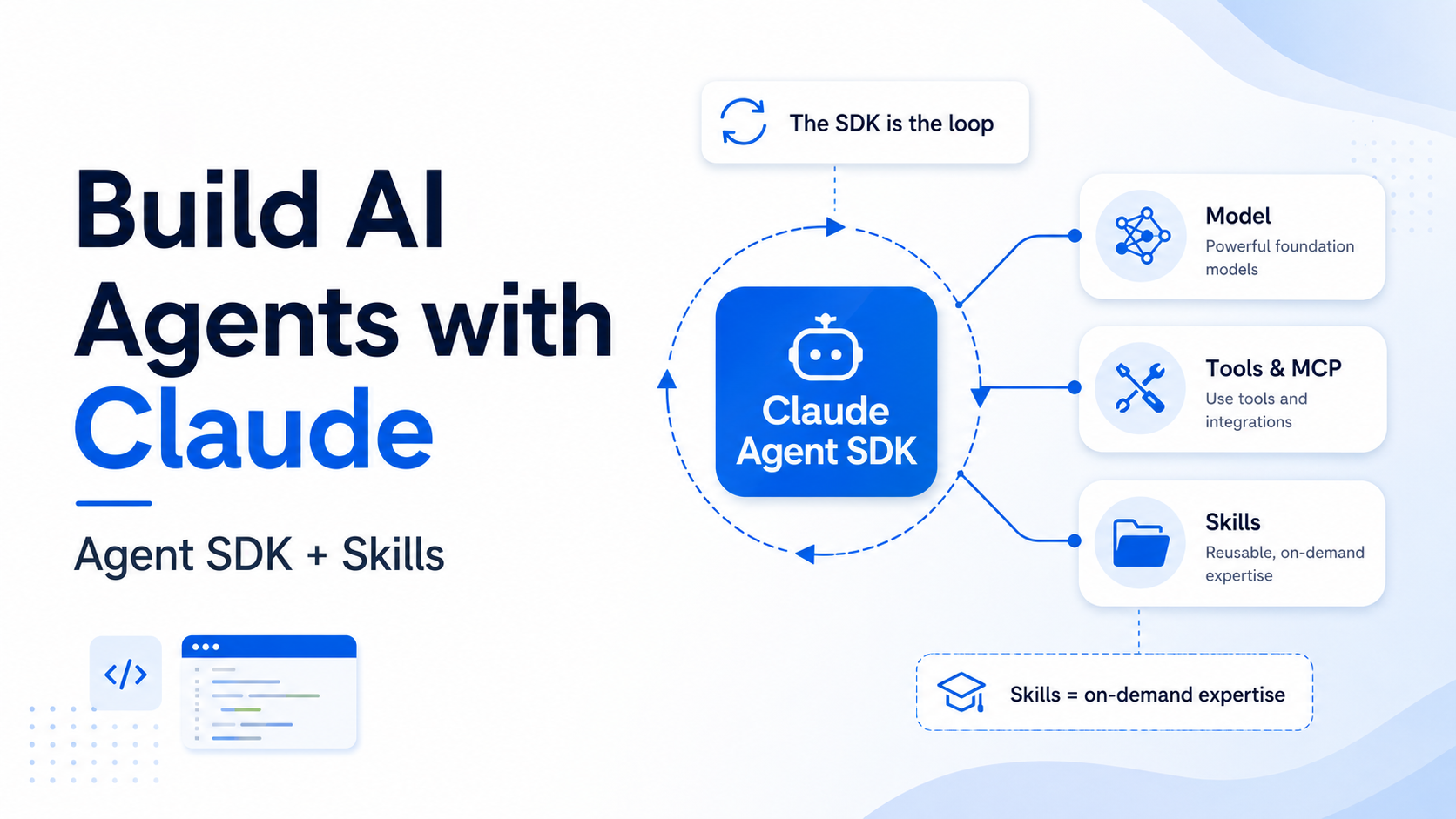

To build an AI agent with Claude in 2026 you combine two things: the Claude Agent SDK and Agent Skills. The Agent SDK is the runtime — it gives you the same agent loop, built-in tools and context management that power Claude Code, programmable in Python (pip install claude-agent-sdk) or TypeScript. Agent Skills are folders containing a SKILL.md file that teach the agent how to do specialised work, loaded on demand via progressive disclosure so they cost almost nothing until they are needed. The one-line mental model: the SDK is the loop, tools and MCP are what the agent can do, and Skills are what it knows how to do. Get those three layers right and most of “agent building” is just configuration.
What does “building an agent with Claude” actually mean in 2026?
Building an agent with Claude means assembling three layers, not writing one giant prompt. The layers are easy to confuse because vendors market them together, so separate them once and the rest of this guide falls into place:
- The model — a Claude model such as Claude Opus 4.7 that reads context and decides the next step. On its own a model only produces text; it cannot touch your files or call your APIs.
- The runtime — the Claude Agent SDK. It wraps the model in an agent loop: gather context, call the model, run the tool the model asked for, feed the result back, repeat until the task is done. This is the same loop that runs inside Claude Code, exposed as a library.
- The capabilities and the knowledge — built-in tools, MCP servers and subagents are capabilities (what the agent can do); Agent Skills are knowledge (how to do a specific job well).
If you remember one sentence from this article, make it this: the SDK is the loop, tools and MCP are what the agent can do, and Skills are what it knows how to do. A lot of teams stall because they try to cram procedural knowledge (“how we write a compliance memo”, “our PowerPoint house style”) into tool definitions or a bloated system prompt. That is the wrong layer. Tools are verbs; Skills are the manual. The diagram later in this guide makes the split visual, and it maps cleanly onto the broader AI agent architecture if you want the conceptual version first.
One more framing that saves weeks of confusion: an AI agent is not automatically the right shape for every job. If your task is a fixed sequence of steps, a deterministic agentic workflow is cheaper and more reliable than a free-roaming agent. The Agent SDK happily runs both — you decide how much latitude the model gets.
What is the Claude Agent SDK?
The Claude Agent SDK is a library that gives you Claude with built-in tool execution. With the raw Anthropic API you implement your own tool loop; with the Agent SDK, Claude runs the loop for you and ships with file, shell and search tools out of the box. Anthropic describes it as “the same tools, agent loop, and context management that power Claude Code, programmable in Python and TypeScript.”
Install it from your language’s package manager:
The TypeScript package bundles a native Claude Code binary as an optional dependency, so you do not need to install Claude Code separately. The SDK also authenticates through Amazon Bedrock, Google Vertex AI and Microsoft Foundry if you run Claude there.
query() vs ClaudeSDKClient: the two entry points
The SDK gives you two ways in, and choosing correctly is the first real decision:
query()— a one-shot async function that streams messages back. Best for scripted, fire-and-forget tasks (“find and fix the bug in auth.py”).ClaudeSDKClient— a long-lived client for bidirectional, interactive conversations. Unlikequery(), it additionally enables custom tools and hooks defined as your own functions. Reach for it when the agent needs to talk back and forth or run your in-process tools.
Here is the difference the SDK removes for you, side by side:
The built-in tools you get for free
Your agent can read files, run commands and search a codebase the moment you install the SDK — no tool execution to wire up. The key built-in tools:
| Tool | What it does |
|---|---|
| Read / Write / Edit | Read any file, create new files, make precise edits to existing ones |
| Bash | Run terminal commands, scripts and git operations |
| Glob / Grep | Find files by pattern (**/*.ts) and search file contents with regex |
| WebSearch / WebFetch | Search the web and fetch/parse page content for current information |
| Monitor | Watch a background script and react to each output line as an event |
| Agent | Spawn a subagent to handle a focused subtask (see below) |
| AskUserQuestion | Ask the user clarifying questions with multiple-choice options |
How do you write your first Claude agent?
A working agent is a few lines. This one reads files, finds a bug and edits it — you only declare which tools it may use:
The TypeScript shape is identical in spirit:
Note allowed_tools here. It pre-approves those tools so they run without a permission prompt — it is a convenience for trusted, scripted runs, not the only way to grant tools. We come back to real permission control further down, because in production “which tools can run unattended” is the question that keeps you out of trouble.
How do you give your agent new capabilities — tools, MCP and subagents?
Built-in tools cover reading, running and searching. Everything specific to your systems comes from three mechanisms. All three are capabilities — they expand what the agent can do.
Custom tools with @tool
Define a Python function, decorate it with @tool, and expose it through an in-process MCP server created by create_sdk_mcp_server. The tool runs inside your application — no separate process, no network hop:
External systems via MCP
The Model Context Protocol connects your agent to databases, browsers and hundreds of existing servers. You point the SDK at a command that launches the server; the agent gets its tools. This example wires in the Playwright server for browser automation:
If you are new to the protocol itself, the dedicated explainer on what MCP is covers why it became the integration standard.
Subagents for focused subtasks
A subagent is a specialised agent your main agent delegates to. It gets its own instructions and its own narrow tool set, then reports back — the same pattern explored in depth under multi-agent systems. Subagents are invoked through the Agent tool, so include Agent in allowed_tools to auto-approve them:
Subagents keep the main context clean: each one works in its own context window, and messages from inside a subagent carry a parent_tool_use_id so you can trace which work belongs to which agent. Do not treat a subagent as a permission shortcut, though. Give each subagent the narrowest tools it needs and keep the parent Agent tool approval separate from the permissions inside the delegated work.
What are Agent Skills, and how do they differ from tools?
An Agent Skill is a folder containing a SKILL.md file plus optional scripts and reference files that teach Claude how to do a specific job. Where a tool is a single capability (“send an email”, “query the DB”), a Skill is the procedural knowledge around a task — the workflow, the house rules, the templates. Anthropic frames the gap precisely: “Claude is powerful, but real work requires procedural knowledge and organizational context.” A Skill is that context, packaged.
The minimum is a single Markdown file with YAML frontmatter:
Two fields are required: name (max 64 chars, lowercase letters, numbers and hyphens; cannot contain “anthropic” or “claude”) and description (non-empty, max 1024 chars). The description is the most important line in the whole file, because it is what Claude reads to decide when to use the Skill — write it to say both what the Skill does and when to reach for it.
Progressive disclosure: why Skills are nearly free until used
The reason you can install dozens of Skills without blowing up your context window is progressive disclosure. A Skill loads in levels, and only the level you need enters context:
| Level | When loaded | Token cost | Content |
|---|---|---|---|
| 1 · Metadata | Always, at startup | ~100 tokens per Skill | name + description from the YAML frontmatter |
| 2 · Instructions | When the Skill is triggered | Under 5k tokens | The SKILL.md body — workflows and guidance |
| 3+ · Resources | As needed | Effectively unlimited | Bundled files and scripts, run via bash without loading their contents |
Concretely: at startup Claude only sees “PDF Processing — extract text and tables from PDFs, fill forms, merge documents.” When you ask it to summarise a PDF, it runs bash to read SKILL.md into context. It decides form-filling is not needed, so it never reads FORMS.md. And when a Skill bundles a script, Claude runs it and receives only the output — the script’s code never enters context, which makes bundled scripts far cheaper and more reliable than asking the model to regenerate the same code each time. As Anthropic puts it, an agent “with a filesystem and code execution tools doesn’t need to read the entirety of a skill into their context window.”
That last point is the real difference from a fat system prompt: a Skill can ship comprehensive API docs, large schemas and dozens of examples at zero context cost until the moment a task touches them.
How do Skills and the Agent SDK fit together?
In the Agent SDK, Skills live as folders on disk under .claude/skills/<name>/SKILL.md (project-level) or ~/.claude/skills/ (personal), exactly as in Claude Code. In many SDK runs, discovered Skills are available by default from the configured settings sources; use the skills option when you want to restrict the set to named Skills or explicitly enable all discovered Skills:
The skills parameter is a selection filter, not a replacement for discovery. Pass a list to expose only named Skills, pass "all" to expose every discovered Skill, or leave it unset when the default discovered set is what you want. The SDK enables the Skill tool when Skills are active, so you do not add "Skill" to allowed_tools. If you override setting_sources, make sure the sources that contain your Skills are still included; otherwise the filter can be correct while discovery finds nothing.
The skills list is a context filter, not a sandbox. Unlisted Skills are hidden from the model and rejected by the Skill tool, but their files still sit on disk and may remain reachable through filesystem or shell tools depending on the permissions you grant. Do not store secrets in Skill files and assume the filter protects them.
The diagram below is the whole architecture on one screen. Memorise the two columns in the middle — capabilities versus knowledge — because that split is the thing most “how to build an agent” tutorials skip.
Skills vs MCP vs tools vs subagents — which should you reach for?
These four mechanisms overlap enough to cause genuine confusion. The decision is less about capability and more about what kind of thing you are adding. Use this table as a reach-for guide:
| You want to… | Reach for | Because |
|---|---|---|
| Give the agent a single new action (send email, query DB) | Custom tool (@tool) | A tool is one verb the model can call with typed inputs |
| Connect a whole external system (browser, Postgres, SaaS) | MCP server | MCP is the standard for integrating existing tools and data sources |
| Teach the agent how to do a multi-step job your way | Agent Skill | A Skill packages procedural knowledge, templates and scripts, loaded on demand |
| Isolate a noisy or specialised subtask | Subagent | It runs in its own context window and reports back a clean result |
The clean way to say it: tools and MCP are capabilities, Skills are knowledge, subagents are organisation. Anthropic is explicit that Skills “complement rather than replace” MCP — MCP focuses on external tool integration, while Skills teach the agent the workflows that use those tools, and lean on deterministic bundled scripts where reliability matters more than flexibility. In practice a serious agent uses all four: built-in tools and an MCP server or two for capability, a couple of Skills for house-specific know-how, and subagents to keep the main loop focused.
How do you keep an agent safe in production?
An autonomous loop with shell access is exactly as dangerous as it sounds, so the SDK gives you three control points: permission modes, hooks, and Skill provenance. Production-grade AI architecture treats these as mandatory, not optional.
Permission modes and allow-lists
The simplest control is which tools may run unattended. allowed_tools pre-approves specific tools; a read-only agent simply never gets Write, Edit or Bash. For broader posture you set permission_mode — for example "acceptEdits" to auto-approve file edits during a trusted refactor while still gating riskier actions. Start restrictive and widen only where you have a reason to.
Hooks: deterministic control over agent behaviour
Hooks run deterministic code at points in the agent lifecycle. For SDK code, the most important guardrail hooks are PreToolUse and PostToolUse: inspect a tool call before it runs, block it, then log the result after it runs. Some lifecycle events and hook-loading paths differ between Python, TypeScript and settings-file hooks, so check the SDK reference before assuming every Claude Code hook maps to an in-process callback. A PreToolUse hook can inspect and deny a call before it runs, which is how you put hard, non-model guardrails around an agent:
A PostToolUse hook is equally useful for the boring-but-critical job of writing every file change to an audit log — the deterministic record regulators and incident reviews actually trust.
Treat third-party Skills like installing software
Anthropic’s guidance is blunt: use Skills only from sources you trust — ones you wrote or got from Anthropic. A malicious Skill can direct Claude to invoke tools or run code in ways that do not match its stated purpose, leading to data exfiltration or unauthorised access. Skills that fetch external URLs are especially risky, because fetched content can carry injected instructions. Audit every bundled file — SKILL.md, scripts, resources — before use, exactly as you would vet a dependency.
Agent SDK vs Client SDK vs Managed Agents vs the CLI — when to use each?
Anthropic ships several ways to build, and picking the wrong one wastes weeks. Here is the honest comparison:
| Option | What it is | Best for |
|---|---|---|
| Client SDK (raw API) | Direct API access; you implement the tool loop | Full control, no built-in tools, simple single-turn calls |
| Agent SDK | Library that runs the agent loop in your process, on your files and services | Local prototyping, CI/CD, custom apps, agents that act on your infrastructure |
| Managed Agents | Hosted REST API; Anthropic runs the agent and a sandbox per session | Production agents without operating sandbox/session infrastructure; long-running async work |
| Claude Code CLI | The same agent loop as an interactive terminal tool | Daily interactive development and one-off tasks |
A common, sensible path: prototype locally with the Agent SDK, then move to Managed Agents when you need Anthropic to own the sandbox and session log for production. Many teams also run the Claude Code CLI for daily development and the SDK for automation — workflows translate directly between them, and if you are still choosing your daily driver, the best AI coding assistants of 2026 roundup compares the field.
Starting 15 June 2026, Agent SDK and claude -p usage on subscription plans draw from a new monthly Agent SDK credit, separate from your interactive usage limits. If you are budgeting an SDK-based product on a Claude plan rather than pure API billing, model this separately. Use of the SDK is governed by Anthropic’s Commercial Terms of Service.
Personal note: what I actually run
I am not writing this from the outside. The system behind DecodeTheFuture.org — the one that drafts, validates and ships these articles — is a Claude agent set-up, and it is deliberately built as a workflow with a small number of agentic nodes, not a free-roaming agent. The editorial pipeline is deterministic (research → draft → SEO gate → internal links → publish); the model gets latitude only inside the writing node.
The interesting part for this article: my house style, the SEO rules, the HTML standards and the bibliography discipline are not in a giant prompt — they live in a Skill, the same SKILL.md shape described above. That is the payoff of the capability-versus-knowledge split in practice: the tools never change, but the knowledge evolves every week, and editing one Markdown file is how the agent gets better without re-engineering anything. It is the same instinct I learned trading CFDs on Plus500 — the edge is rarely a new instrument, it is a tighter, written-down process you actually follow. Skills are that process, made executable.
What does this mean in practice?
Building an agent with Claude in 2026 is mostly a layering decision, and once you see the layers the work gets small. Buy the runtime, compose the capabilities, write the knowledge. The Agent SDK gives you a production-grade loop you should not rebuild. Tools, MCP and subagents are how you connect the agent to the world — add them deliberately, gated by permissions and hooks. Skills are how you make the agent good at your work specifically, and progressive disclosure means you can add a lot of them without paying for any you do not use.
The teams that struggle are the ones that put knowledge in the tool layer or capability in the prompt. Keep the split clean — loop, capabilities, knowledge — and “agent building” stops being a research project and becomes configuration plus a few Markdown files. Start with a five-line query() agent today, add one Skill for the job you do most often, and let the architecture grow from there.
FAQ
What is the Claude Agent SDK?
It is a Python and TypeScript library that gives you Claude with built-in tool execution — the same agent loop, built-in tools (Read, Write, Edit, Bash, Glob, Grep, WebSearch, WebFetch and more) and context management that power Claude Code. Unlike the raw Anthropic API, where you implement the tool loop yourself, the Agent SDK runs the loop for you. Install it with pip install claude-agent-sdk or npm install @anthropic-ai/claude-agent-sdk.
Is the Claude Agent SDK free to use?
You pay for the model usage. On API billing you pay per token as usual. On Claude subscription plans, from 15 June 2026 Agent SDK and claude -p usage draws from a new monthly Agent SDK credit that is separate from your interactive usage limits, so budget it as its own line. Use of the SDK is governed by Anthropic’s Commercial Terms of Service.
What is the difference between Agent Skills and MCP?
MCP integrates external tools and data sources — databases, browsers, APIs — giving the agent new capabilities (what it can do). Agent Skills package procedural knowledge — workflows, templates, house rules and bundled scripts — teaching the agent how to do a specific job well (what it knows). Anthropic positions them as complementary: Skills often teach the agent the workflows that use MCP tools. Most real agents use both.
Do I need Claude Code installed to use the Agent SDK?
No. The Python package is a standalone pip install. The TypeScript package bundles a native Claude Code binary for your platform as an optional dependency, so you do not install Claude Code separately either. You set an ANTHROPIC_API_KEY (or configure Bedrock, Vertex AI or Microsoft Foundry) and you are ready to run agents.
Where do Agent Skills work, and do they sync across surfaces?
Skills work across claude.ai, Claude Code, the Claude Agent SDK and the Claude API, as an open cross-platform specification. They do not sync automatically: a Skill uploaded to claude.ai is not available on the API, API Skills are not on claude.ai, and Claude Code Skills are filesystem-based and separate from both. Sharing scope also differs — claude.ai Skills are per-user, API Skills are workspace-wide, and Claude Code Skills live in ~/.claude/skills/ or .claude/skills/.
Should I use the Agent SDK or Managed Agents?
Use the Agent SDK when the agent should run inside your own process and act on your filesystem and services — ideal for local prototyping, CI/CD and custom apps. Use Managed Agents when you want Anthropic to run the agent and a per-session sandbox for you, including long-running asynchronous work, without operating that infrastructure yourself. A common path is to prototype with the Agent SDK, then move to Managed Agents for production.
Are Agent Skills safe to install from other people?
Treat them like installing software. A Skill contains instructions and code that Claude can execute, so a malicious one could direct the agent to misuse tools or exfiltrate data, and Skills that fetch external URLs are especially risky. Anthropic’s guidance is to use Skills only from trusted sources — ones you created or obtained from Anthropic — and to audit every bundled file before use, particularly before putting a Skill into a production system with access to sensitive data.
Source note: Sources prioritise Anthropic’s official Agent SDK and Agent Skills documentation, the Anthropic engineering blog and the open-source SDK and Skills repositories. Product status, pricing and dates (including the 15 June 2026 Agent SDK credit) reflect Anthropic documentation current at publication and may change — verify against the live docs before relying on them. Links accessed 23 May 2026.
Bibliography (17 sources)
- Anthropic. Agent SDK overview. Install commands, the agent loop, built-in tools, hooks, subagents, MCP, permissions, sessions and the Agent SDK vs Client SDK vs Managed Agents comparison; includes the 15 June 2026 Agent SDK credit note. code.claude.com/docs/en/agent-sdk/overview
- Anthropic. Agent SDK quickstart. Step-by-step build of a bug-fixing agent. code.claude.com/docs/en/agent-sdk/quickstart
- Anthropic. Agent SDK reference — Python. Full Python API:
query(),ClaudeSDKClient,ClaudeAgentOptions, custom tools and hooks. platform.claude.com/docs/en/agent-sdk/python - Anthropic. Agent SDK reference — TypeScript. Full TypeScript API and examples. platform.claude.com/docs/en/agent-sdk/typescript
- Anthropic. Agent Skills overview. What a Skill is, the
SKILL.mdstructure and required fields, the three levels of progressive disclosure with token costs, where Skills work, and security considerations. platform.claude.com/docs/en/agents-and-tools/agent-skills/overview - Anthropic. Equipping agents for the real world with Agent Skills (engineering blog). The design rationale: progressive disclosure, composability, portability, and how Skills relate to MCP. anthropic.com/engineering/equipping-agents-for-the-real-world-with-agent-skills
- Anthropic. Skill authoring best practices. How to write
nameanddescriptionfields and structure Skills Claude can use effectively. platform.claude.com/docs/en/agents-and-tools/agent-skills/best-practices - Anthropic. Use Skills with the Claude API. The
containerparameter,skill_id, required beta headers and the code-execution environment. platform.claude.com/docs/en/build-with-claude/skills-guide - Anthropic. Use Skills in Claude Code. Filesystem-based custom Skills in
~/.claude/skills/and.claude/skills/. code.claude.com/docs/en/skills - Anthropic. Use the Claude Agent SDK with your Claude plan (support). Details of the monthly Agent SDK credit effective 15 June 2026. support.claude.com/en/articles/15036540
- Anthropic. Managed Agents overview. Hosted REST API where Anthropic runs the agent and sandbox per session. platform.claude.com/docs/en/managed-agents/overview
- Anthropic. Building Effective Agents, 19 December 2024. The canonical workflow-versus-agent distinction underlying the layering in this guide. anthropic.com/engineering/building-effective-agents
- Anthropic (GitHub). claude-agent-sdk-python. Source, README and
ClaudeAgentOptionstype including theskillsparameter. github.com/anthropics/claude-agent-sdk-python - Anthropic (GitHub). skills. Open-source Agent Skills published by Anthropic, including the Claude API skill bundled with Claude Code. github.com/anthropics/skills
- Model Context Protocol. Reference servers. The catalogue of MCP servers the Agent SDK can connect to. github.com/modelcontextprotocol/servers
- Anthropic (GitHub). claude-agent-sdk-demos. Example agents — email assistant, research agent and more — built with the SDK. github.com/anthropics/claude-agent-sdk-demos
- Anthropic. The Complete Guide to Building Skills for Claude (PDF). Anthropic’s playbook for authoring effective Skills. resources.anthropic.com/…/The-Complete-Guide-to-Building-Skill-for-Claude.pdf
Recent Comments
ABOUT US
Newspaper is your news, entertainment, music fashion website. We provide you with the latest breaking news and videos straight from the entertainment industry.
Contact us: [email protected]
FOLLOW US
© Newspaper WordPress Theme by TagDiv