

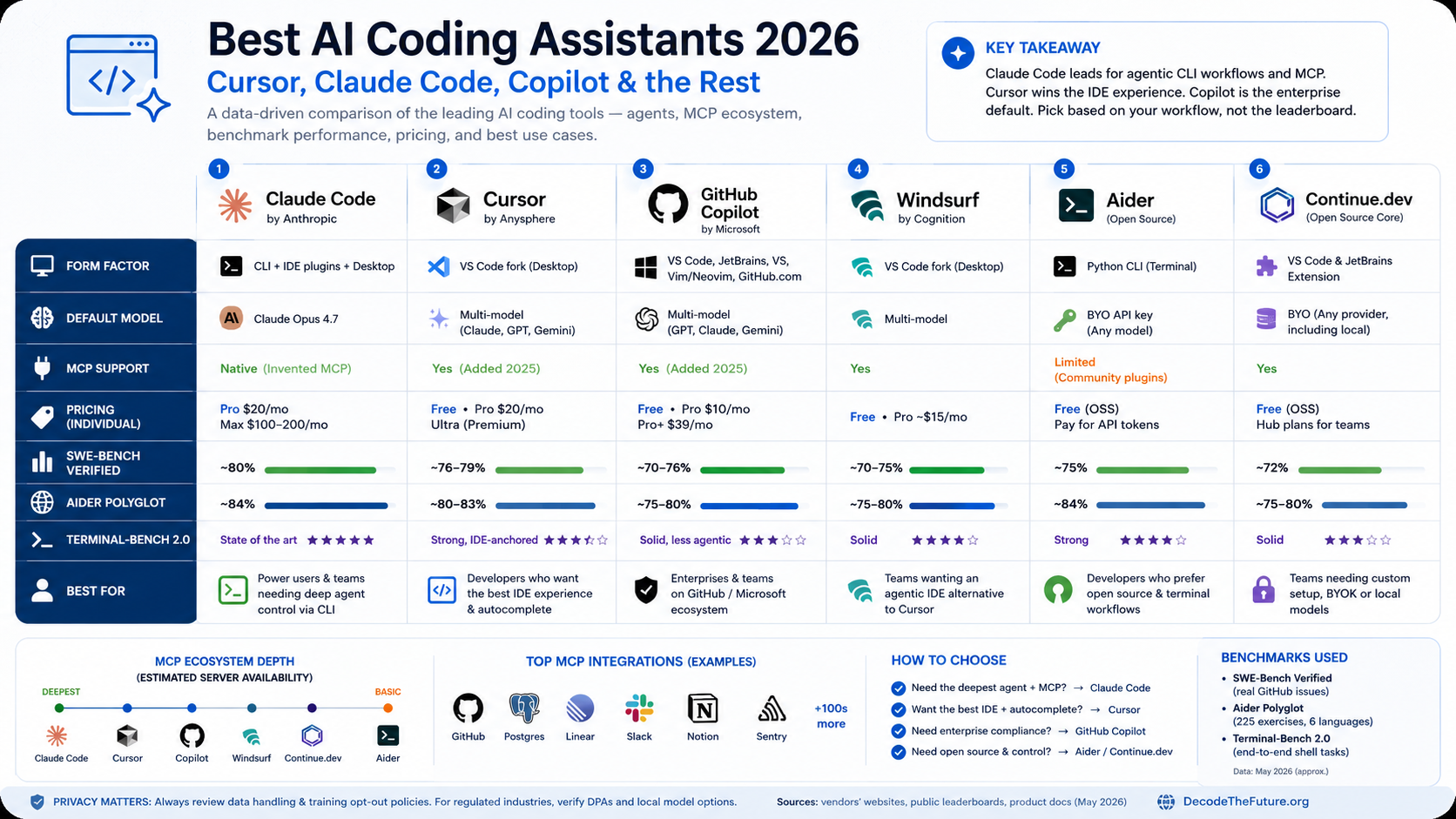

The best AI coding assistant in 2026 depends on your workflow, not the leaderboard. Claude Code wins for terminal-native agentic work and the deepest MCP/skills/hooks ecosystem. Cursor remains the strongest IDE experience with its Composer agent and tab autocomplete. GitHub Copilot is the safe enterprise default with multi-model routing. Windsurf, Aider, and Continue.dev cover the remaining niches. Pick one for daily use, keep a free OSS tool as a fallback.
What changed in AI coding tools between 2024 and 2026?
Three structural shifts redrew the map. First, agent mode became the default, not a feature flag. By mid-2025 every serious assistant ran a multi-step loop — read files, edit, run tests, iterate — instead of single-turn completions. Second, Model Context Protocol (MCP), introduced by Anthropic in November 2024, became the de facto standard for connecting tools to coding assistants. By 2026, Cursor, Claude Code, GitHub Copilot, and Windsurf all support it, but the implementations diverge in ways that matter. Third, frontier-model pricing collapsed for input tokens and rose for reasoning output: a single Claude Opus 4.7 agent run on a 100k-line repo can cost $3–8 in tokens — small per task, painful at scale.
The market also consolidated. Cursor (Anysphere) and Cognition’s Windsurf-derived stack passed the $1B ARR threshold during 2025 according to industry trackers. GitHub Copilot crossed 50 million users in early 2026. Anthropic’s Claude Code shipped a plugin marketplace, skills, hooks, and a desktop app. The losers are old-style autocomplete tools: Tabnine pivoted to enterprise, Kite shut down years ago, and code-only completion without agentic context now feels like writing in a typewriter.
AI coding assistants are general-purpose AI systems under EU AI Act Art. 51–55. Their providers (Anthropic, OpenAI, Google, Microsoft) carry the GPAI obligations — copyright disclosure, technical documentation, systemic-risk evaluations above the 10²⁵ FLOPs training threshold. You as a user generally don’t carry those obligations, but if your AI-generated code ships in a high-risk system listed in Annex III (medical devices, biometric ID, critical infrastructure, employment screening, credit scoring), the deployer obligations from Art. 26 still apply to your finished product. The tool didn’t make you compliant; your code did.
How we evaluated the best AI coding assistants
Most “best of” lists rank by marketing budget. We ranked by what actually decides the daily use experience. Six axes:
- Agent loop quality: how well the tool plans, edits across files, runs tests, and recovers from errors without hand-holding.
- Model strength on real benchmarks: SWE-Bench Verified (real GitHub issues from 12 popular Python repos), Aider polyglot (225 hard exercises across 6 languages), and Terminal-Bench 2.0 (end-to-end shell tasks).
- MCP and tool ecosystem: how many production-grade integrations exist, how easy it is to add your own.
- Cost reality: subscription price plus what happens when you hit the included token limit.
- Privacy and data handling: what’s stored, where, retention windows, opt-out paths for training.
- Personal field experience: I’ve used Claude Code, Cursor, and Copilot daily across the last year on this site (DTF Brain) and on competitive-math tooling. The article you’re reading was written in Claude Code with the
dtf-articleskill loaded.
For an introduction to the underlying models, see Claude Opus 4.7 explained, Introducing GPT-5.5, and Mixture-of-Experts architecture for the engine room of these assistants.
The 6 best AI coding assistants in 2026 — full reviews
1. Claude Code — best for terminal-native agentic work
Claude Code is Anthropic’s official command-line agent. It runs as a long-lived process in your terminal, with the file system as its workspace and arbitrary shell commands as its tools. The agent loop reads files, makes edits, runs tests or builds, reads the output, and iterates until the task closes. Because Anthropic invented MCP, Claude Code has the largest pool of compatible tool servers — file systems, browsers, GitHub, Postgres, Linear, Jira, custom internal APIs.
Three features genuinely separate it from the field. Skills are markdown specifications loaded on demand that teach the agent project-specific workflows (the DTF article skill you’d be reading evidence of right now). Hooks are shell-command triggers that fire on tool events — a real safety net for “always run prettier after Edit” or “block dangerous bash patterns.” Plugins, shipped late 2025, allow distribution of skills, hooks, and slash commands as installable bundles. None of this exists in Cursor or Copilot in the same coherent way.
2. Cursor — best dedicated AI IDE
Cursor took VS Code, removed friction, and bolted on three first-class AI surfaces: Tab (multi-line autocomplete that predicts your next edit, not just the next token), Cmd+K (inline rewrite), and Composer (multi-file agent mode). The autocomplete is the differentiator — after Anysphere’s 2024 acquisition of Supermaven, Tab became eerily good at predicting refactors, often jumping you to the next file the change requires.
Composer evolved through 2025 from a sidebar chat into a genuine agent that plans, opens files, runs the embedded terminal, and edits across the workspace. Pricing is generous on the free tier (limited tab completions, two-week trial of pro features) but expensive at scale: the Ultra tier (effectively all-you-can-eat with reasonable rate limits) is priced for power users running thousands of agent steps per day.
3. GitHub Copilot — best enterprise default
Copilot is the safe choice in 2026 for the same reason GitHub itself was the safe choice in 2018: it’s already in your enterprise contract, your security review, and your IDE. Microsoft made the strategic call mid-2024 to stop forcing OpenAI models and turned Copilot into a model router — Claude Sonnet 4, GPT, Gemini, and o-series reasoning models are all selectable, with admins able to whitelist by policy. Agent mode (formerly “workspace”) landed in 2025 and now runs multi-file changes with test execution.
What you give up versus Cursor or Claude Code: less aggressive autocomplete, slightly older agent ergonomics, and a UX optimized for compatibility with existing GitHub workflows rather than for raw productivity. What you gain: SAML SSO, audit logs, indemnification, training-data exclusion guarantees, and the lowest ramp cost for an org that already runs on GitHub Enterprise.
4. Windsurf — best agentic IDE alternative to Cursor
Windsurf — formerly Codeium — built Cascade, an agent surface with strong long-horizon planning and a particularly clean diff review UX. The 2025 ownership saga (a partial reverse-acquihire of leadership by Google for licensed tech, with the remaining IDE entity acquired by Cognition, the makers of the Devin agent) left some uncertainty in the air. As of early 2026 the product is alive, shipping, and benefits from Cognition’s agent research, but the customer trajectory is harder to predict than Cursor’s.
Cascade’s killer feature is what they call “Flows” — the agent maintains context across sessions and surfaces what changed since you last touched a file. For long-running projects this is closer to the way a senior reviewer keeps state than what most agent tools offer. If you tried Cursor and disliked it, Windsurf is the obvious second look.
5. Aider — best open-source terminal coder
Aider is the OSS reference implementation of agentic pair programming. It edits via diffs, commits to git after each successful change, and runs your tests if you tell it to. The maintainer also publishes the Aider polyglot benchmark, which is one of the more honest measures of cross-language coding ability — 225 hard exercises spanning Python, JavaScript, Rust, Go, C++, and Java with hidden test files.
The win is sovereignty: your code never leaves your machine except as model API calls you control. The trade-off is missing polish — no autocomplete, no IDE, no inline suggestions. You drive every action via terminal commands. For backend developers who already live in Vim or Emacs, this is a feature, not a bug.
6. Continue.dev — best customizable IDE extension
Continue.dev is the answer to “I want Cursor’s experience, but in vanilla VS Code, on my own keys, with my own models.” It exposes chat, edit, agent, and autocomplete surfaces inside an unmodified IDE, with every aspect — model picker, tools, slash commands, system prompts — defined in YAML you check into the repo. For teams that want a shared AI workflow without locking into a fork, this is the cleanest path.
The main caveat is that you’re effectively assembling your own product: you choose the autocomplete model (Codestral, Qwen Coder, DeepSeek), the chat model (Claude or GPT), the embedding model for context retrieval. Done well it beats the closed alternatives on flexibility. Done badly, you spend a Saturday tuning configs instead of shipping code.
How do AI coding assistants compare on price and benchmarks?
Two tables tell most of the story. First, what you actually pay:
| Tool | Free tier | Individual paid | Team / Business | Token overage model |
|---|---|---|---|---|
| Claude Code | Limited via Claude Free | Pro $20/mo (rate limits) | Max $100–200/mo · API metered | API at standard Anthropic rates beyond included quota |
| Cursor | Yes (limited fast/slow requests) | Pro $20/mo | Business $40/user/mo · Ultra premium | Bundled “fast/slow request” credits; BYOK option |
| GitHub Copilot | Yes (50 chats, 2k completions/mo) | Pro $10/mo · Pro+ $39/mo | Business $19/user/mo · Enterprise $39/user/mo | Premium-request packs sold separately |
| Windsurf (Cognition) | Yes | Pro ~$15/mo | Teams / Enterprise quote | Credit-based |
| Aider | Free (OSS) | Free | Free | You pay model APIs directly — full transparency |
| Continue.dev | Free (OSS) | Free OSS · Hub paid | Hub team plans (quote) | You pay model APIs directly |
Then, what they can actually do — measured on the three benchmarks that matter for daily coding work. SWE-Bench Verified, Aider polyglot, and Terminal-Bench 2.0. Note that benchmarks score the model the tool runs on, not the tool itself, but each tool defaults to or recommends a specific configuration:
| Configuration | SWE-Bench Verified | Aider polyglot | Terminal-Bench 2.0 |
|---|---|---|---|
| Claude Code · Claude Opus 4.7 | ~80% (top tier) | ~84% | State of the art |
| Cursor Composer · Claude Opus 4.7 / GPT-5.5 mix | ~76–79% | ~80–83% | Strong, IDE-anchored |
| Copilot Agent · Claude Sonnet 4 / GPT-5.5 | ~70–76% (depending on model) | ~75–80% | Solid, less agentic |
| Windsurf Cascade · multi-model | ~70–75% | ~75–80% | Solid |
| Aider · Claude Opus 4.7 (BYOK) | ~75% (with diff edit format) | ~84% (own benchmark) | Strong |
A 5-percentage-point benchmark difference rarely matters for a single developer. Variance from how you scope a task, what tests already exist, and whether the codebase has good naming swamps the model gap. What matters more: agent loop reliability on your specific stack, ergonomics of the surface you live in 8 hours a day, and whether the tool fails loudly or quietly when it’s wrong.
What is MCP and which assistants support it?
Model Context Protocol is an open standard introduced by Anthropic in November 2024. It defines how an AI application (the “host” — your coding assistant) talks to external tools and data sources (the “servers”). Before MCP, every assistant invented its own plugin format. After MCP, one server can plug into Claude Code, Cursor, Copilot, Windsurf, or Continue without rewrites.
By 2026 the protocol covers four primitives: tools (functions the model can call), resources (read-only data like files or DB rows), prompts (server-suggested prompt templates), and sampling (servers that ask the host to call the model on their behalf). The ecosystem now spans hundreds of community servers — Postgres, GitHub, Linear, Slack, Sentry, Notion, Figma, browser automation, every major CRM.
| Assistant | MCP support | Practical depth |
|---|---|---|
| Claude Code | Native — invented protocol | Hundreds of servers; first-class config; remote and local both supported |
| Cursor | Yes (added 2025) | Most popular servers work; project-level config; fewer auth flows than Claude Code |
| GitHub Copilot | Yes (added 2025) | Curated servers; tighter enterprise governance; smaller universe than Cursor |
| Windsurf | Yes | Solid for major tools; rougher edges on niche servers |
| Aider | Limited (community plugins) | Workable but not built-in; expect to write glue code |
| Continue.dev | Yes | YAML-configured servers; works with local-only setups; clean for regulated environments |
If you’re a backend engineer routinely pulling Linear tickets, querying a staging database, and pushing to GitHub from inside the assistant, MCP support depth matters more than the model itself. For a deeper dive on the protocol in production, see our walkthrough of the TradingView MCP server as a real-world example.
Which AI coding assistant should you pick? Five concrete recommendations
Generic answers are useless here. Five practitioner profiles and the call I’d make for each.
You’re a solo developer working on side projects
Pick Cursor Pro at $20/mo. The autocomplete alone earns it back; Composer covers your agent needs; you don’t care about enterprise SSO. Run Aider on the side for situations where you want full control over which model touches your code (e.g., contributions to projects with strict licensing).
You’re at an enterprise on GitHub Enterprise
Use Copilot. Procurement and security reviewed it. Train your team on agent mode. Pilot Claude Code or Cursor for a single squad if Copilot’s agent UX limits you, but in 2026 you fight one battle at a time and the model-router story closed most of the gap.
You’re a power user running agentic workflows
Claude Code on Max plan. The skills/hooks/plugins triple is the only reproducible way to encode “how my org wants AI to work” into something a teammate can install. The terminal-first UX is a feature: it composes with your existing scripts, dotfiles, and CI without translation.
You work in a regulated industry (finance, healthcare, defence)
Continue.dev with local models or BYOK to a vetted provider. Pair with rigorous code review and the EU AI Act Art. 26 deployer checklist for any output that lands in a high-risk system. Avoid SaaS-only tools that route your code through a vendor cloud unless your DPA explicitly carves out training-data exclusion in writing.
You’re a student or junior developer learning
Aider with a Claude or DeepSeek API key, plus the free tier of Cursor. The first teaches you the agent loop transparently — every diff is visible, every commit is yours. The second gives you autocomplete to keep velocity up while you build skill. Avoid jumping straight to Composer or Cursor Ultra: the more autonomous the assistant, the less you learn from each task.
Personal note: what writing this article was like
The article you’re reading was written in Claude Code with the dtf-article skill loaded — a 240-line markdown file that teaches the agent DTF’s editorial standards (light theme, AIO box pattern, FAQ + JSON-LD requirement, source bibliography format). The skill loaded automatically when I asked for “another premium-RPM article.” The agent ran the WordPress sitemap crawler before writing, checked the existing English article inventory for internal linking opportunities, and read two source files (anthropic-products.md, openai-gpt.md) to ground the model claims.
Could I have written this in Cursor? Yes — the autocomplete would have been better when typing CSS. Could I have written it in Copilot? Yes — the model itself is the same Anthropic Claude class. The reason I keep coming back to Claude Code for editorial workflows is the skills layer: the article structure, the SEO checklist, the WordPress META block format are all encoded once and reproduced consistently across sessions and across agents I might delegate the work to.
Could I have written it without an AI assistant at all? Yes, but it would have taken three days instead of one afternoon, and the bibliography would have been thinner. AI coding assistants are not magic and they do not replace judgment — but in 2026, opting out of them is opting into being slower than people who are otherwise no smarter than you. That’s not a recommendation, just an observation about the market.
What about Replit Agent, Bolt.new, v0, and the rest?
The article focuses on assistants that integrate with your existing IDE or terminal. The browser-based “build me an app from a prompt” category — Replit Agent, Bolt.new (StackBlitz), v0 (Vercel), Lovable — solves a different problem. They’re excellent for prototyping, throwaway internal tools, and non-developer founders. They’re a poor fit for an existing codebase you maintain over years.
Two enterprise-leaning options also deserve a mention. Tabnine pivoted hard to private deployment and on-prem inference; if you need an assistant that runs entirely in your VPC with no third-party calls, it’s the most mature option. Cody (Sourcegraph) sits on top of Sourcegraph’s code intelligence graph, which is valuable for very large monorepos where retrieval quality is the limiting factor.
How will AI coding assistants evolve through 2026?
Three plausible directions are already visible in early-2026 product roadmaps.
First, multi-agent orchestration. Instead of one agent doing everything, your IDE will spawn a planner, a writer, a reviewer, and a tester in parallel. Cursor and Claude Code both shipped early versions of this in late 2025 (Cursor’s “background agents,” Claude Code’s task tool dispatching subagents). Expect this to become standard.
Second, longer-running asynchronous tasks. The unit of work shifts from “complete this function” to “open this PR and iterate until tests pass and CI is green,” potentially over hours rather than minutes. Cognition’s Devin has the strongest claim here historically; the integrated-IDE players are racing to match it.
Third, regulatory tightening on training data. The EU AI Act’s Art. 53 obligations on GPAI providers — including a publicly available summary of training content — pressure on third-party code corpora used to train coding models. Expect more “trained only on permissively licensed code” branding, more provenance disclosures, and possibly forks of major models trained on stricter datasets.
For a broader frame on how these tools fit into the AI economy, see Anthropic’s advisor strategy explained and the LLM wiki Karpathy pattern, which explains why coding assistants are arguably the most economically important LLM application of the decade.
FAQ — best AI coding assistants 2026
Which AI coding assistant is the most accurate in 2026?
On public benchmarks, Claude Opus 4.7 driving Claude Code or Cursor Composer is at the frontier — roughly 80% on SWE-Bench Verified and ~84% on Aider polyglot. GPT-5.5 in Cursor or Copilot trails by a few points but pulls ahead on some reasoning-heavy tasks. The gap is small enough that ergonomics, agent loop quality, and tool ecosystem usually decide more than raw model accuracy.
Is Cursor better than GitHub Copilot for individual developers?
For solo developers and small teams, Cursor’s autocomplete (Tab) and agent (Composer) deliver more daily value than Copilot for the same $20/month. For developers inside a GitHub Enterprise or Azure-DevOps shop, Copilot wins on procurement, compliance, and the fact that it’s already on your machine. The right answer depends on whether you control your tooling stack.
What is MCP and why does it matter for picking a coding assistant?
Model Context Protocol is an open standard from Anthropic for connecting tools and data sources to AI assistants. Tools that support MCP — Claude Code, Cursor, Copilot, Windsurf, Continue.dev — can share the same ecosystem of integrations (GitHub, Postgres, Linear, browsers, custom internal APIs). If you do anything beyond writing isolated functions, MCP support depth is one of the top three things to evaluate.
Can I use AI coding assistants without my code being used to train models?
Yes, but only on plans that explicitly say so. GitHub Copilot Business and Enterprise exclude your code from training by default. Anthropic’s API and Claude Code on paid plans don’t train on your data. Cursor’s privacy mode is opt-in. OpenAI API also excludes data from training by default. Free consumer chatbot tiers are the most permissive — read the policy before pasting proprietary code.
Are AI coding assistants compliant with the EU AI Act?
The assistants themselves are general-purpose AI systems whose providers (Anthropic, OpenAI, Google, Microsoft) carry the GPAI obligations under Articles 51–55 of Regulation (EU) 2024/1689. As a developer using them, you don’t carry those obligations directly, but if your AI-assisted code ships in a system listed in Annex III (high-risk applications like credit scoring, biometric ID, medical devices, employment), you carry deployer obligations under Article 26 — risk management, human oversight, logging, conformity assessment. The tool didn’t make you compliant; your code did.
What is the best free AI coding assistant?
For an autocomplete-first IDE experience, Cursor’s free tier and GitHub Copilot’s free tier (50 chats, 2,000 completions/month) are both usable. For an agentic CLI experience, Aider is free as software — you only pay for the model API tokens you actually consume, and you can plug in DeepSeek or local Ollama models for near-zero cost. Continue.dev with local Qwen Coder or DeepSeek models is the cleanest fully-local option.
How much should I expect to spend per month on an AI coding assistant in 2026?
For a solo developer or small team using a single assistant on a flat plan: $10–40/month per seat (Copilot Pro to Business, Cursor Pro to Business). For a heavy agent user running long Composer or Claude Code tasks daily: $100–300/month is realistic when token-metered usage is included. For an enterprise standardizing across hundreds of seats: $19–39/seat/month plus negotiated overages. Free OSS tools (Aider, Continue.dev) shift the cost to direct API spend, which is often $20–80/month for active users.
Bibliography & sources
- Anthropic — Claude Code product page (CLI agent, MCP-native, skills, hooks, plugins).
- Anthropic — Claude Opus 4.7 (default Claude Code model; pricing and capabilities).
- Anthropic — Introducing the Model Context Protocol (Nov 2024 announcement).
- Model Context Protocol — official specification & SDK docs.
- Anysphere / Cursor — official site (Composer, Tab, Cmd+K, pricing).
- GitHub — Copilot product page (multi-model, agent mode, plans).
- GitHub — Copilot plans documentation.
- OpenAI — Introducing GPT-5.5 (April 2026; default for Codex; multi-IDE coding integration).
- Cognition — Windsurf acquisition announcement (2025).
- Aider — official documentation; polyglot leaderboard.
- Continue.dev — documentation (configuration as code, MCP support, local models).
- SWE-Bench — benchmark and leaderboard (Verified subset).
- Terminal-Bench — official benchmark site (end-to-end shell agent tasks).
- European Union — Regulation (EU) 2024/1689 (AI Act); in particular Articles 26 (deployer obligations), 51–55 (GPAI), and Annex III (high-risk systems).
- Microsoft Learn — Copilot Free plan documentation.
- JetBrains — AI Assistant programming guide (multi-IDE landscape context).
- Stack Overflow — Developer Survey 2024 — AI tools section (adoption baseline; 2025 edition for trend update where applicable).
- Sourcegraph — Cody product page (enterprise / monorepo angle).