

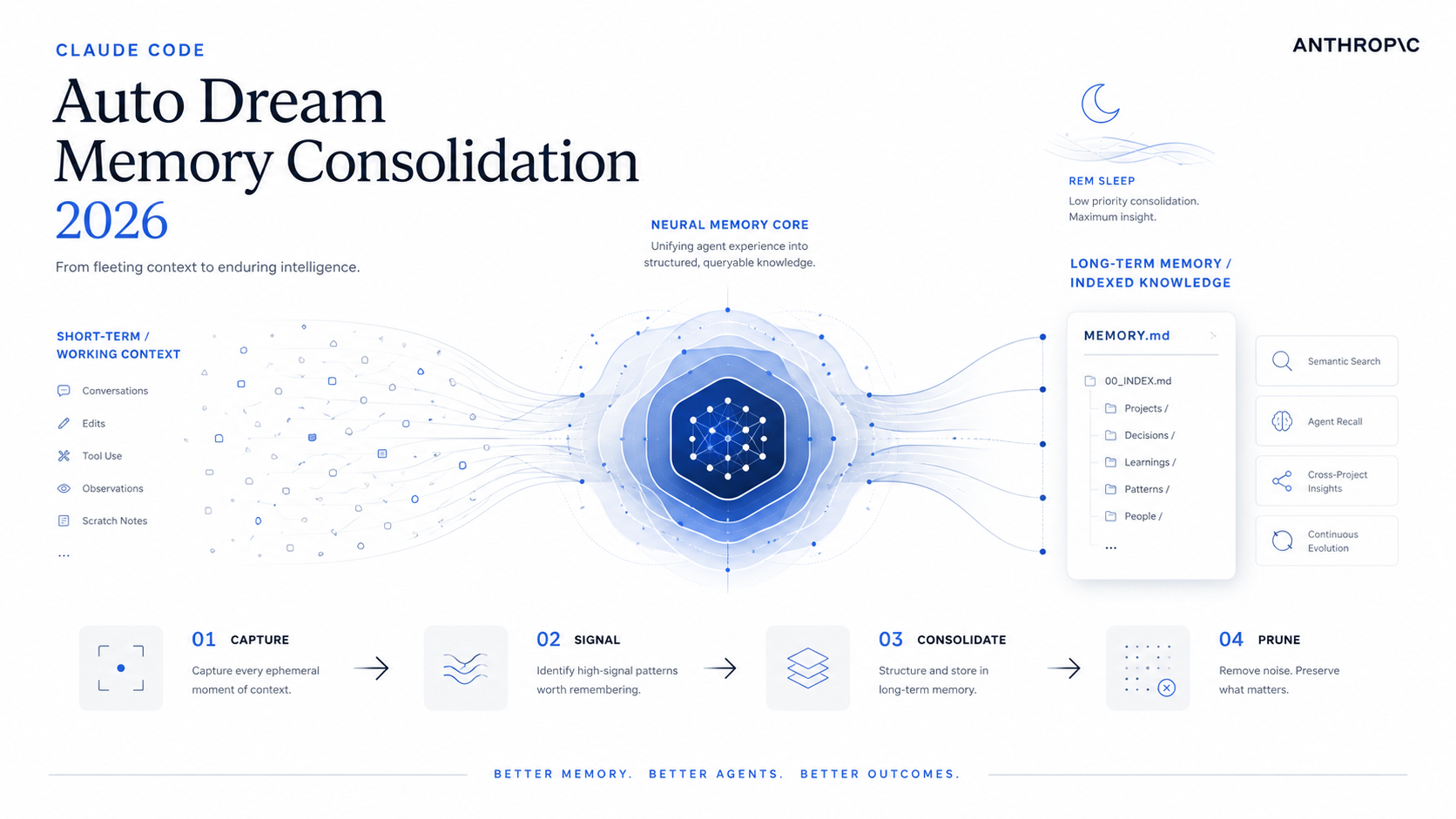

Auto Dream is Claude Code’s background memory-consolidation routine. Between sessions it reads your recent transcripts, merges new facts into MEMORY.md and topic files, deletes contradicted notes, converts relative dates to absolute ones, and trims the index back under 200 lines. It triggers automatically after 24 hours and at least 5 sessions of new activity, or manually with /dream. The metaphor Anthropic uses is deliberate: this is the REM-sleep cycle that turns short-term Auto Memory notes into durable long-term project knowledge — and it’s the piece almost no other coding assistant ships natively.
What is Auto Dream in Claude Code?
Auto Dream is a background subagent that consolidates Claude Code’s auto-memory files. It runs after enough activity has accumulated, reads through recent session transcripts, and rewrites the memory directory into something coherent — keeping facts that still hold, deleting facts that have been contradicted, merging duplicates, and rebuilding the MEMORY.md index. While Auto Memory captures notes during work, Auto Dream cleans them between sessions.
The mechanism complements Claude Code’s existing memory stack rather than replacing it. Anthropic’s official memory documentation already describes CLAUDE.md (instructions you write) and auto memory (notes Claude writes itself, stored at ~/.claude/projects/<project>/memory/). Auto Dream is the maintenance layer on top — the missing fourth piece that prevents auto memory from rotting after twenty or fifty or two hundred sessions.
Independent reporting from Tessl, claudefa.st, and antoniocortes.com documents the feature appearing in Claude Code internals; the leaked system prompt ships in the Piebald-AI/claude-code-system-prompts repository, and a community replica called dream-skill already exists on GitHub. The feature is real, observable in the wild, and being studied closely by people building agent memory systems.
Cognitive neuroscience treats sleep — and REM in particular — as the brain’s mechanism for consolidating short-term hippocampal memories into long-term cortical storage. Anthropic chose the name “Auto Dream” because that is functionally what it does: take the hot, noisy, contradictory short-term notes and rewrite them into clean, durable knowledge. It is the closest thing in current AI tooling to genuine memory hygiene.
Why does Claude Code need a memory consolidation pass?
Anthropic’s docs are explicit that auto memory accumulates two things: useful patterns and noise. The first 200 lines of MEMORY.md (or 25 KB, whichever comes first) load into every new conversation. After enough sessions, that index fills up with three failure modes:
- Contradicted facts. “API uses Express” was true in March; you switched to Fastify in April. The old line is still there.
- Stale debugging notes. A workaround you needed once for a bug that’s now fixed. Still loaded into every session.
- Relative dates. “Yesterday we decided to use Redis.” Six weeks later, “yesterday” is meaningless and Claude has no way to anchor when the decision actually happened.
Auto Memory has no built-in mechanism to age out, deduplicate, or resolve contradictions — that is by design. Auto Memory is the pen; Auto Dream is the editor. Without consolidation, every new session starts from a slightly noisier baseline, and at some point the index hits the 200-line cutoff and starts truncating. New, useful patterns get crowded out by old, irrelevant ones.
How does Auto Dream work? The 4-phase consolidation pipeline
The leaked system prompt and independent technical writeups all converge on the same structure: four sequential phases that take the agent from “what’s in memory now?” to “what should be in memory next?”.
Phase 1 — Orient: read what already exists
Before deciding what to change, the subagent reads MEMORY.md in full, opens the topic files referenced from the index, and reviews any daily activity logs. The goal is the same one a human archivist would have: build a current-state map before touching anything. No writes happen in this phase.
Phase 2 — Gather Signal: grep narrowly, don’t read everything
The system prompt is unusually emphatic on this point. The exact instruction is “grep narrowly, don’t read whole files”, and the prompt explicitly warns against exhaustively reading transcripts. The agent uses targeted searches across the JSONL session transcripts in ~/.claude/projects/<project>/transcripts/:
grep -rn "<narrow term>" ${TRANSCRIPTS_DIR}/ \
    --include="*.jsonl" | tail -50
The high-value patterns the agent looks for are: explicit user corrections (“no, not that”), explicit save requests (“remember that…”), recurring themes that appear in three or more sessions, and architectural decisions. Reading whole transcripts would be both expensive and counterproductive — most of a transcript is routine work, not learnings worth promoting to long-term memory.
Phase 3 — Consolidate: merge, age, delete
This is where most of the writing happens. The subagent merges new facts into existing topic files (debugging.md, api-conventions.md, etc.), creates new topic files when a coherent theme has emerged, and runs three specific cleanup passes:
- Date normalization. “Yesterday we decided to use Redis” becomes “On 2026-03-15 we decided to use Redis.” Relative time references inside a long-lived knowledge base are bugs.
- Contradiction resolution. If the topic file says the API uses Express but recent transcripts confirm a Fastify migration, the old line gets deleted, not annotated.
- Deduplication. Three sessions noting the same build-command quirk collapse into one clean entry.
Phase 4 — Prune and Index: rebuild MEMORY.md
The final pass updates MEMORY.md itself. This file is special: Anthropic’s docs confirm that only the first 200 lines or 25 KB load into each new session. Anything past that cutoff is dead weight. The leaked prompt enforces additional micro-rules: index entries should be roughly 150 characters max, lines over ~200 characters should have their detail moved into topic files, and content must never be stored directly in the index — pointers only.
When does Auto Dream trigger?
Two automatic triggers fire when both conditions are met:
- ≥ 24 hours since the last consolidation. Dreaming is for things that have settled overnight.
- ≥ 5 sessions of new activity since the last consolidation. Below five sessions there is rarely enough new signal to justify a rewrite.
Manual triggers exist as well. The /dream command runs consolidation immediately. Natural-language phrasing like “consolidate my memory files” or “dream” is also recognized. One observed run reportedly processed 913 sessions in 8–9 minutes as a background process — slow enough that you would not want it inline, fast enough that running it manually before a long offline trip is reasonable.
A lock file prevents concurrent runs in the same project. This avoids two consolidation passes racing each other and producing inconsistent merges. If you trigger /dream while one is already running, the second invocation no-ops cleanly.
The four-layer Claude Code memory system
Auto Dream only makes sense in the context of the full memory stack. Anthropic ships four mechanisms that work together:
| Layer | Who writes it | Loaded | Purpose |
|---|---|---|---|
CLAUDE.md |
You | Every session, in full | Persistent instructions, conventions, build commands |
| Auto Memory | Claude (during work) | First 200 lines / 25 KB of MEMORY.md |
Patterns, debugging insights, learned preferences |
| Session Memory | Claude (per conversation) | Conversation summary, ~5K tokens | Carry context across /compact within one session |
| Auto Dream | Claude (background) | Rewrites Auto Memory between sessions | Consolidate, deduplicate, age out, re-index |
Each layer has a different write cadence and a different scope. CLAUDE.md is for things you would want to re-explain every session; auto memory is for things Claude figures out on its own; session memory keeps a single conversation coherent across compaction; Auto Dream is the only one that reaches back across multiple sessions and rewrites history.
This stack matches a real cognitive architecture more closely than any other coding assistant currently shipping. Working memory, episodic capture, in-conversation recall, and offline consolidation each map to a distinct mechanism in Claude Code. You can argue with the metaphor — biology is messier — but the design points at something real.
What the file layout actually looks like
Auto memory lives at ~/.claude/projects/<project>/memory/ by default. The <project> path is derived from the git repository, so worktrees of the same repo share one directory. A representative directory after a few weeks of use:
memory/
├── MEMORY.md             # Index, ≤200 lines, loaded every session
├── debugging.md          # Detailed bug patterns
├── api-conventions.md    # API design decisions, route layout
├── build-and-test.md     # Build commands, test gotchas
├── deployment.md         # Deploy targets, env vars
└── activity-log-2026-05.md   # Daily log Claude appends to
And here is what a healthy MEMORY.md looks like after a Dream pass — short pointers, no content stored inline, one line per topic file:
# Project Memory Index

- [debugging.md](debugging.md) — recurring bug patterns, last reviewed 2026-05-06
- [api-conventions.md](api-conventions.md) — route naming, error format, OpenAPI rules
- [build-and-test.md](build-and-test.md) — npm scripts, flaky test triage, CI rules
- [deployment.md](deployment.md) — Fly.io targets, env-var contract, rollback playbook
- [activity-log-2026-05.md](activity-log-2026-05.md) — daily log, current month
- [activity-log-2026-04.md](activity-log-2026-04.md) — daily log, archived
The MEMORY.md from the system reminder at the top of this very session — listing project, feedback, and reference files with one-line descriptions — is exactly the post-Dream shape Anthropic designed the prompt to produce.
How is this different from Cursor, Continue, or Aider?
This is where the strategic picture gets interesting. None of the three closest competitors to Claude Code ship comparable native memory consolidation in May 2026:
| Tool | Built-in persistent memory | Consolidation pass | How users get it today |
|---|---|---|---|
| Claude Code | ✅ Auto Memory (native) | ✅ Auto Dream (native) | Default behavior, /dream manual trigger |
| Cursor | ❌ No first-party | ❌ No | Third-party MCP servers: ContextForge, Basic Memory, Graphiti, Recallium, or hand-rolled .brain/ folder conventions |
| Continue | Partial (rules, config) | ❌ No | User-maintained rule files, no automatic write-back |
| Aider | Partial (chat history files) | ❌ No | Manual --read flags pointing at convention files |
The Cursor community has spent the past year retrofitting the same idea — see the long-running “Persistent, intelligent project memory” feature request on the Cursor forum, and the proliferation of MCP-based add-ons such as ContextForge, Basic Memory, Graphiti, and Zep. All of them work, but all of them require the user to install, configure, and maintain a separate stack just to get a feature Claude Code now ships with on by default.
That is the part that should make Cursor users uncomfortable. Memory is not a feature in the product-checklist sense; it is a property of the agent. Building it from third-party MCP plumbing is workable, but it is structurally a generation behind a tool that bakes memory consolidation into the system prompt of a dedicated subagent.
The opinion: this is Anthropic’s quiet agent moat
Most of the public Claude-vs-OpenAI noise in 2026 has been about model benchmarks, rate limits, and infrastructure deals — like Anthropic’s 300 MW SpaceX compute partnership announced this week. Auto Dream is a smaller story by raw news weight, but it is part of a more important pattern: Anthropic is building agent infrastructure into Claude Code that competitors will struggle to match without restructuring their products.
The pattern, briefly:
- Skills — packaged, on-demand instruction bundles that load only when relevant. Removes the trade-off between rich instruction sets and context bloat.
- MCP (Model Context Protocol) — a standard surface for plugging external tools and data into the agent.
- Auto Memory — automatic, no-effort capture of session learnings.
- Auto Dream — automatic, no-effort consolidation of those learnings.
Each piece in isolation is interesting. Together they form a stack that gives the agent persistent, self-maintaining state without the user owning a vector database, embedding pipeline, or RAG system. That is the design choice. It is also the choice that makes Claude Code feel different the longer you use it: the agent in week six knows things about your project that the agent in week one did not, and you did not have to author or curate those things.
The risk Anthropic is taking is straightforward — auto-written, auto-consolidated memory is harder to audit than memory you wrote yourself. The mitigation is also straightforward: every memory file is plain Markdown you can open, edit, or delete with /memory. That is a deliberate design decision and the right one. The alternative — opaque embeddings in some hosted vector store — would be faster but unauditable.
How to use Auto Dream today
If you are running Claude Code v2.1.59 or later, auto memory is already on. Auto Dream rolls out behind the same flag. There are three things worth doing as a power user:
1. Run /dream manually before leaving a project for a while
If you are about to switch projects for a week, kicking off a manual consolidation leaves the next session with a clean index instead of accumulated noise.
# From inside a Claude Code session
/dream

# Or natural language equivalents:
"consolidate my memory files"
"dream — clean up the index before I'm gone for a week"
2. Audit your memory directory periodically
Open the directory with /memory and skim the topic files Claude has been writing. If something is wrong, edit it directly — the files are plain Markdown. Auto Dream will preserve your manual edits unless they directly contradict newer transcript signal.
3. Treat MEMORY.md as a real index
If you find yourself scrolling past the 200-line cutoff in MEMORY.md, move detail into a topic file and replace it with a single-line pointer. Auto Dream tries to do this for you on each pass, but giving it a head start means more of the index space stays available for genuinely new signal.
Auto memory can be toggled in settings (autoMemoryEnabled: false in project settings, or CLAUDE_CODE_DISABLE_AUTO_MEMORY=1 as an env var). The storage location can be redirected with autoMemoryDirectory in user settings, but only from policy or user scope — never from the project, which would let a cloned repo redirect writes to sensitive paths.
Limitations and known sharp edges
- Machine-local only. Auto memory is not synced across machines or cloud environments. If you work from a laptop and a desktop, each maintains its own memory directory.
- Per-repo, not per-worktree. All worktrees of the same git repository share one auto-memory directory. Useful for cross-branch coherence; surprising if you expected isolation.
- Read-only for project code. Auto Dream can only write to memory files. It cannot touch source, tests, or config — by design.
- Background runs are not free. The 8–9 minute run on 913 sessions is fast given the scope, but it is still meaningful CPU and token spend if you trigger consolidation aggressively. Default cadence (24h + 5 sessions) is calibrated to keep the cost negligible.
- Subagents have separate memory. Specialized subagents can maintain their own auto memory, which means a consolidation pass at the parent project level does not necessarily clean up subagent state. See Anthropic’s subagent docs.
What this means for the next twelve months
Three predictions, none of them exotic:
Cursor will ship native persistent memory in 2026. The forum demand is too loud and the structural disadvantage too obvious to leave to third-party MCP indefinitely. The interesting question is whether they ship a consolidation pass too, or only the capture half — Auto Memory without Auto Dream is the easier feature to build.
Memory consolidation becomes a benchmark. “How does the agent perform after fifty sessions?” is a different question than “how does the agent perform on a clean repo?” and the answer depends almost entirely on memory hygiene. Expect academic and industry evals to start measuring long-horizon agent performance with explicit memory-quality controls.
The MEMORY.md / topic-file convention becomes a de facto standard. The shape Anthropic landed on — short Markdown index, separate topic files, on-demand reads — is simple enough that other tools will adopt it for portability. The .brain/ folder conventions in the Cursor community already converge on something close.
None of this means Anthropic has won anything. Models change, market dynamics shift, and the gap between “we ship a memory consolidation subagent” and “we ship the best coding agent” is non-trivial. But Auto Dream is the kind of unglamorous infrastructure feature that compounds quietly. A year from now it is the kind of thing people forget Claude Code ever had to ship — because by then the alternative will feel obviously broken.
Auto Dream FAQ
Is Auto Dream a separate product or part of Claude Code?
It is part of Claude Code, not a separate product. Auto Dream is a background subagent that runs against the auto-memory directory at ~/.claude/projects/<project>/memory/. You don’t install it separately; it ships with Claude Code v2.1.59 or later when the feature flag is enabled.
What’s the difference between Auto Memory and Auto Dream?
Auto Memory is the writing pass — it captures patterns, learnings, and corrections during your active sessions and writes them into MEMORY.md and topic files. Auto Dream is the editing pass — it runs between sessions, reads what Auto Memory has accumulated, and rewrites it: merges duplicates, deletes contradictions, converts relative dates to absolute ones, and rebuilds the index. Auto Memory is short-term; Auto Dream is consolidation into long-term storage.
How do I trigger Auto Dream manually?
Use the /dream slash command inside a Claude Code session. Natural-language phrases like “consolidate my memory files” or “dream the memory” also work. The agent will run the four-phase consolidation pipeline as a background process and print a summary when done. A lock file prevents concurrent runs, so a second invocation while one is already running is a no-op.
Will Auto Dream delete things I’ve written into MEMORY.md myself?
It can, if your manual entries directly contradict newer transcript signal — the consolidation pass treats fresher facts as authoritative. For instructions you want preserved unconditionally, the right place is CLAUDE.md (instructions you write, loaded in full every session) rather than MEMORY.md (auto-managed index). Anthropic’s official docs are explicit on this split.
Why does Anthropic call it “Dream”? Isn’t that anthropomorphizing?
The metaphor is intentional and reasonably accurate. In neuroscience, REM sleep is associated with consolidating short-term hippocampal memories into long-term cortical storage — the same role this subagent plays for the agent’s memory files. Calling it “Dream” rather than “Consolidate” is partly branding, partly a useful mental model: it runs while you’re not watching, and what comes out is cleaner than what went in.
Can Cursor or Continue users replicate Auto Dream?
Partially. Cursor users have several third-party paths: ContextForge, Basic Memory, Graphiti, Recallium, and various .brain/ folder conventions, all routed through MCP. None of them currently ship a four-phase consolidation pass identical to Auto Dream — most stop at the capture half. A community Claude Code skill called dream-skill reproduces the consolidation logic for users who want it on a non-default trigger.
Is there a privacy implication to Auto Memory and Auto Dream?
Both run locally and write to plain Markdown files in ~/.claude/projects/<project>/memory/. Files are not synced across machines or to Anthropic’s servers as a memory feature. They are subject to the same privacy and telemetry rules as the rest of Claude Code — the memory itself is on your disk, auditable and editable. The thing to be aware of is that what enters auto memory is whatever Claude considered worth remembering from your sessions; if that includes secrets pasted into prompts, those land in plain text on disk too.
Sources & further reading
- Anthropic — How Claude remembers your project (official Claude Code memory docs, includes
CLAUDE.md, auto memory, settings). - Anthropic — Subagent configuration and persistent memory.
- Claudefa.st — Auto Dream: Memory Consolidation in Claude Code (mechanics guide).
- Tessl — Anthropic tests “auto dream” to clean up Claude Code’s memory.
- Antonio Cortés — Auto Memory and Auto Dream: how Claude Code learns and consolidates its memory.
- Zen van Riel — Claude Code AutoDream: Memory Consolidation for AI Agents.
- MindStudio — What Is Claude Code AutoDream? How AI Memory Consolidation Works Like Sleep.
- WMedia — Auto Dream: Claude Code Consolidates Your Memory While You Rest.
- Let’s Data Science — Anthropic introduces dreaming for Claude agent memory consolidation.
- Piebald-AI — Leaked Auto Dream system prompt (full four-phase prompt text).
- grandamenium — dream-skill (community Claude Code skill replicating Auto Dream).
- Cursor community — Persistent, intelligent project memory feature request.
- Basic Memory — Add Persistent Memory to Cursor — Context That Survives Sessions.
- DecodeTheFuture — What is MCP (Model Context Protocol)? (background on the standard Cursor uses for third-party memory).
- DecodeTheFuture — Anthropic Doubles Claude Code Limits + 300 MW SpaceX Compute Deal (related Anthropic infrastructure story).